CloudZen Expertise

Teamcenter Upgrade Consulting, Implementation & Integration Services

CloudZen delivers Teamcenter upgrade, administration, and integration services covering version upgrades to Teamcenter 14, customization remediation, and post-upgrade support.

Upgrade with Confidence. Modernize Without Disruption.

Running an aging or unsupported Teamcenter environment introduces more than technical
limitations. It creates operational risk, weakens supportability, complicates infrastructure
planning, and makes future transformation harder.

CloudZen delivers Teamcenter upgrades through a structured, low-risk, business-aware approach
that combines technical depth with careful planning, remediation, testing, and cutover control.

Typical Teamcenter Upgrade Challenges

Unsupported or Aging Versions (Pre-Teamcenter 14)

Older Teamcenter environments can create security, compliance, and supportability concerns while limiting access to current Siemens capabilities.

Infrastructure Compatibility Risks

Operating systems, databases, browsers, and related components may no longer align cleanly with the target Teamcenter version.

Customization Complexity

Legacy BMIDE, ITK, SOA, workflow logic, and client-side customizations often require detailed review and remediation during upgrade execution.

Teamcenter Integration Dependencies

ERP, CAD, Active Workspace, T4S, and adjacent enterprise connections must be retested and validated to protect business continuity.

Downtime and Rollback Uncertainty

Many organizations lack confidence in cutover windows, fallback planning, and production stabilization during a major upgrade.

Limited Internal Capacity

Upgrade programs often compete with day-to-day operations, leaving too little bandwidth for parallel testing, remediation, and release readiness.

What Our Teamcenter Upgrade Services Include

Upgrade Readiness Assessment

  • Evaluate the current Teamcenter landscape and release level
  • Review architecture, environments, and upgrade constraints
  • Identify technical and operational readiness gaps

Teamcenter 14 Upgrade Path Planning

  • Review supported upgrade paths and target version options
  • Assess technical prerequisites and version dependencies
  • Define the most practical route to modernization

Sandbox / Replicated Environment Setup

  • Create a controlled environment for upgrade execution
  • Support validation, remediation, and rehearsal before production
  • Reduce risk through safe and repeatable testing cycles

Technical Upgrade Execution

  • Upgrade Teamcenter platform components and clients
  • Align configurations with the target architecture
  • Execute the technical upgrade with controlled delivery discipline

Customization Remediation

  • Review and adapt BMIDE, ITK, SOA, and workflow customizations
  • Identify upgrade impacts on existing business logic
  • Reduce technical debt while preserving core functionality

Teamcenter Integration Retesting

  • Validate ERP, CAD, Active Workspace, T4S, and adjacent integrations
  • Confirm continuity across connected enterprise systems
  • Reduce go-live disruption through structured retesting

Performance and Data Validation

  • Run data integrity and regression validation checks
  • Assess performance across upgraded environments
  • Support confidence in platform reliability and business continuity

Cutover Planning and Teamcenter Support Hypercare

  • Prepare cutover sequencing, downtime planning, and rollback strategy
  • Support go-live readiness and production coordination
  • Stabilize and optimize the environment post-upgrade

Business Outcomes

Supported and Future-Ready Platform

Move to a supported Teamcenter release aligned with future Siemens capabilities and evolving infrastructure standards.

Improved Stability and Performance

Reduce technical debt and strengthen platform reliability through structured remediation and validation.

Greater Business Continuity

Execute upgrades with a controlled plan for testing, downtime management, and rollback readiness.

Foundation for Transformation

Prepare the PLM environment for cloud readiness, process modernization, and future digital initiatives.
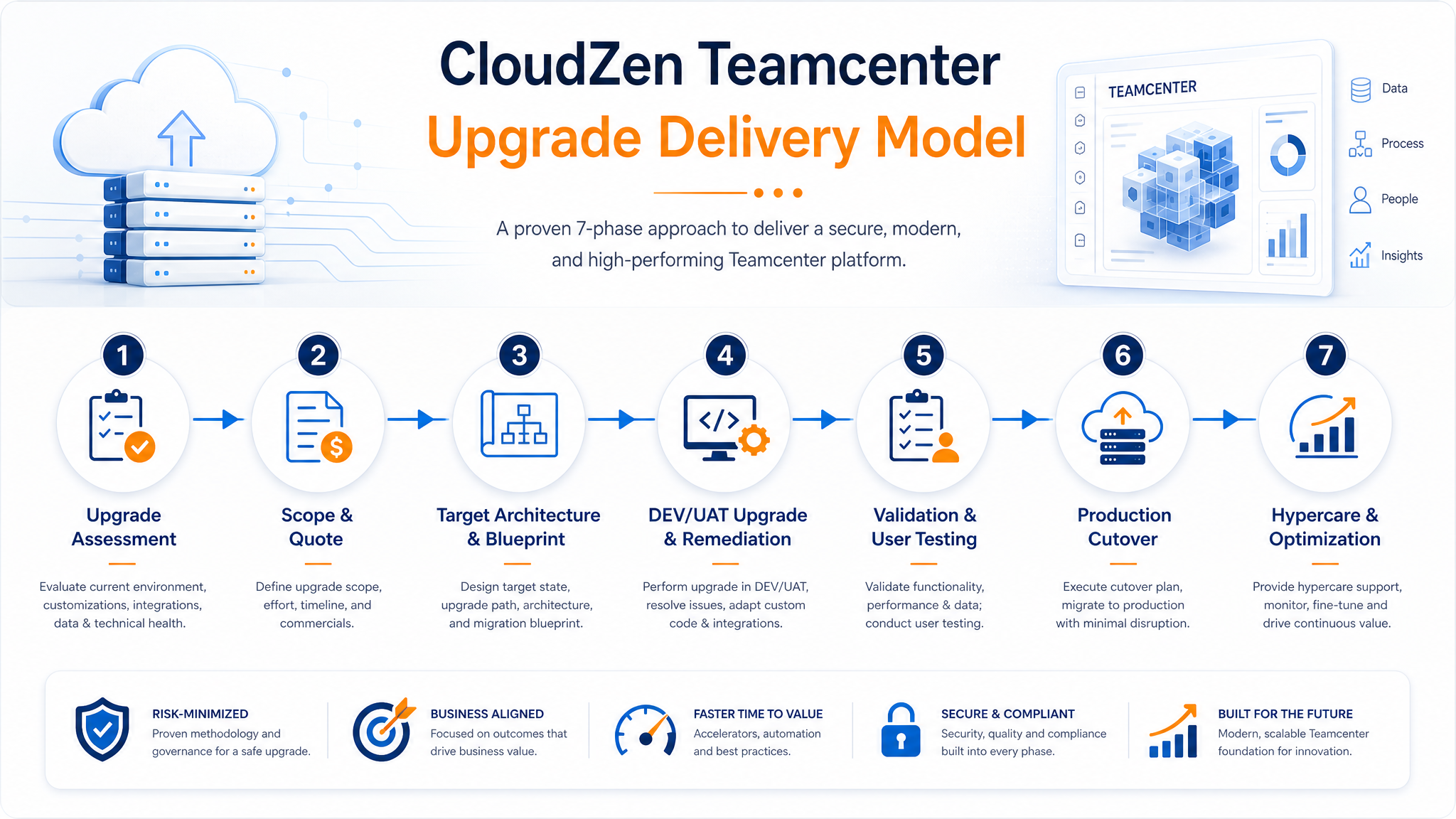
CloudZen Teamcenter Upgrade Delivery Model lighter process illustration

Why CloudZen

Why CloudZen for Teamcenter Upgrade and Integration Services

Business-Led Teamcenter Consulting

We position Teamcenter upgrades as controlled business transformations, not just technical installations. Our approach balances system modernization with stakeholder confidence, operational continuity, and platform readiness.

Deep Teamcenter Integration Experience

We account for the real complexity of Teamcenter environments, including BMIDE, ITK, SOA, workflows, ERP connections, CAD interfaces, Active Workspace, and T4S dependencies.

Senior Teamcenter Consulting from Start to Finish

CloudZen brings senior consulting involvement across assessment, planning, remediation, validation, cutover, and hypercare.

Practical Focus on Downtime and Risk Reduction

Our delivery model emphasizes sandbox execution, controlled testing, rollback awareness, and production cutover discipline to reduce disruption.

Clear Path from Quote to Execution

The offering is structured to move cleanly from initial assessment and quote definition into implementation, testing, go-live, and optimization.

Teamcenter Administration and Support After Go-Live

CloudZen combines the professionalism and structure expected from a major consulting firm with the technical detail, senior involvement, and delivery transparency of a specialist Teamcenter partner.

Request an Initial Quote for Your Teamcenter Upgrade

Get a practical first estimate based on your current Teamcenter release, architecture, environments, integrations, and customization footprint.

Frequently Asked Questions

What is involved in a Teamcenter upgrade?
A Teamcenter upgrade involves a readiness assessment, version and upgrade path planning, sandbox testing, technical execution, customization remediation, integration retesting, performance validation, and cutover with hypercare support.
How do I upgrade to Teamcenter 14?
Upgrading to Teamcenter 14 starts with an assessment of your current release and architecture, followed by version path planning, sandbox validation, customization remediation, and a controlled cutover with rollback planning.
What is Teamcenter administration?
Teamcenter administration covers ongoing platform configuration, user and access management, performance monitoring, and maintenance tasks that keep a Teamcenter environment stable after implementation or upgrade.
How long does Teamcenter integration retesting take?
Integration retesting timelines depend on the number of connected systems, but typically range from two to six weeks to validate ERP, CAD, Active Workspace, and T4S integrations after a Teamcenter upgrade.
Does CloudZen provide Teamcenter support after upgrade?
Yes. CloudZen provides post-upgrade hypercare and ongoing Teamcenter support to stabilize the environment, monitor performance, and resolve issues after go-live.

Ready to Transform Your Business?

Let's discuss how CloudZen can accelerate your digital journey. Free initial consultation — no strings attached.