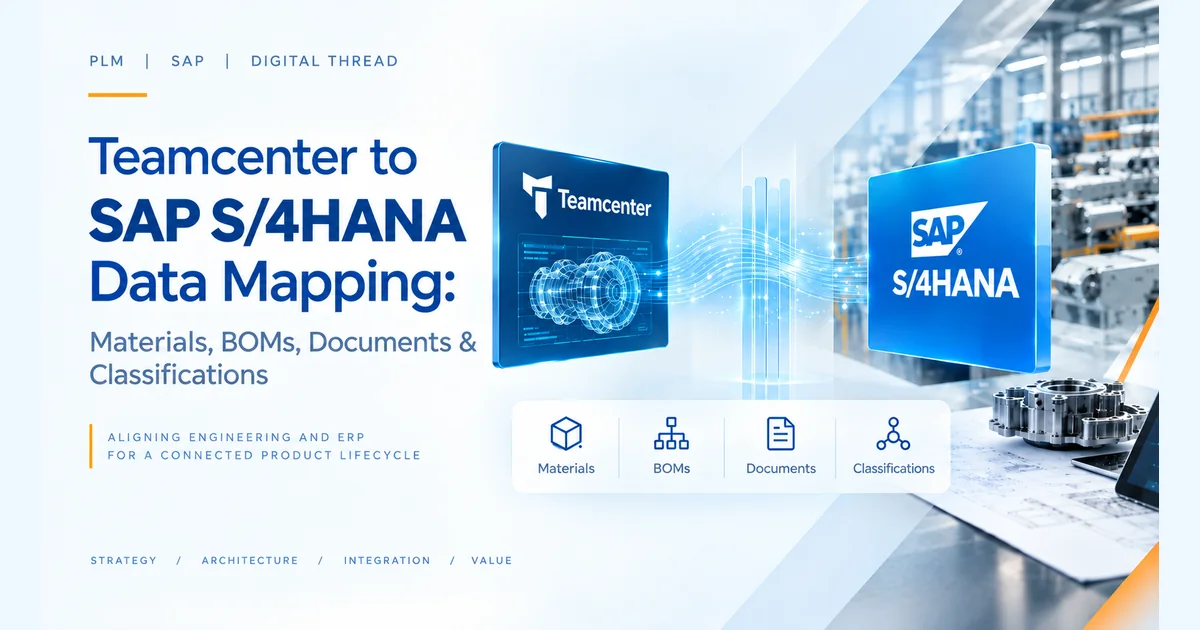
Teamcenter SAP data mapping is rarely an interface problem in a Teamcenter–SAP S/4HANA integration.
The difficult problem is preserving business meaning across two different enterprise data models.
A Teamcenter revision, for example, is not simply an SAP material with a different field name. Its meaning may depend on revision policy, lifecycle, classification, engineering ownership, effectivity and change context. Likewise, an engineering BOM cannot be treated as a collection of rows that simply needs to become an SAP BOM.
At enterprise scale, data mapping becomes an architecture and governance problem.
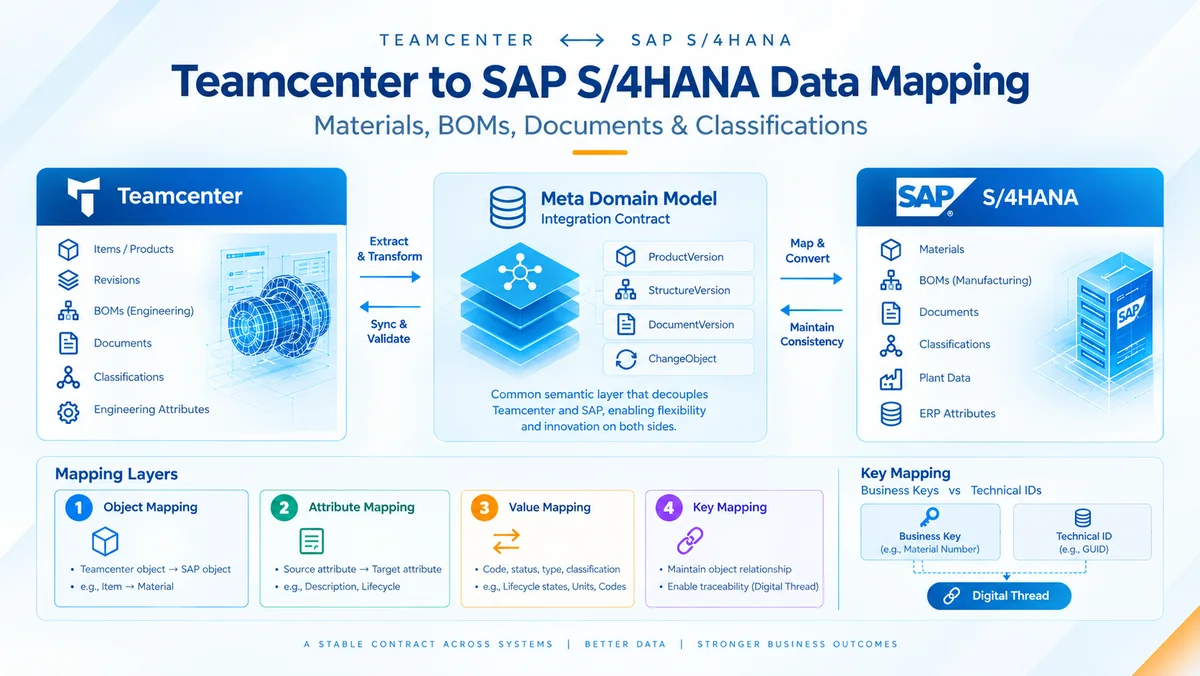
SAP and Siemens address this through the Meta Domain Model, which acts as a common semantic layer between Teamcenter and SAP. Instead of tightly coupling Teamcenter structures directly to SAP implementation objects, each side maps into a shared business model. SAP describes this approach as Separation of Concerns.
The resulting architecture is:
The important question is therefore not: Which Teamcenter field maps to which SAP field?
It is: What business semantics need to cross the system boundary, who owns them, and how are they kept consistent over the product lifecycle?
1. The Mapping Problem Is Bigger Than Field Mapping
At enterprise level, there are at least four different mapping problems:
- Object mapping — Which Teamcenter business object corresponds to which SAP object?
- Attribute mapping — Which source attribute populates which target attribute?
- Value mapping — How are different codes, statuses, types and classifications translated?
- Key mapping — How do we maintain the relationship between the same business object represented in two systems?
These should not be designed as one mapping exercise.
SAP's architecture explicitly separates business keys from the underlying technical IDs and maintains key mappings to create traceability between corresponding Teamcenter and SAP objects. SAP refers to this relationship as a digital thread.
2. The Meta Domain Model as an Integration Contract
The most important architectural concept is the Meta Domain Model.
Teamcenter → SAP Material/BOM/DIR
Teamcenter → ProductVersion / StructureVersion / DocumentVersion / ChangeObject → SAP
This creates an abstraction boundary.
If Teamcenter changes its internal item structures, the Teamcenter-side mapping can be adapted without necessarily redesigning the SAP integration.
Likewise, if SAP changes how a material type or characteristic is represented, the SAP-side mapping can change without forcing a corresponding redesign in Teamcenter.
The condition is that the cross-system interface contract remains stable.
SAP explicitly describes this as allowing innovation on either side without impacting the other side as long as the Meta Domain Model contract is maintained.
Why this matters to enterprise architects
This changes the integration from: system-to-system coupling to: business-semantic integration.
That distinction becomes increasingly important as enterprises operate multiple plants, product lines, Teamcenter configurations and SAP landscapes.
3. Product and Material Mapping
Consider a typical engineering product:
Teamcenter — Item:
- Revision
- Type
- Lifecycle
- Classification
- Engineering attributes
↓ ProductVersion ↓
SAP — Material:
- Revision
- Material type
- Classification
- Plant data
The mapping decision is not simply “Item ID = Material Number.”
Architects need to establish:
- Who owns the enterprise product identifier?
- Is numbering internal or externally assigned?
- Where is revision mastered?
- Which lifecycle states are synchronized?
- Which attributes are engineering-owned?
- Which attributes are ERP-owned?
- When does plant-specific enrichment occur?
- How is classification governed?
SAP's current configuration explicitly supports mapping the Domain Model ProductVersion to the SAP Material Master.
The architectural objective should be clear ownership, not maximum synchronization.
4. BOM Mapping: Preserve Structure, Not Just Components
BOM integration is where simplistic mapping approaches usually break down.
A Teamcenter engineering structure contains business context around the relationship between parent and component.
That context can include:
- Quantity
- UoM
- Position
- Revision
- Effectivity
- Structure type
- Variant/selection logic
- Change context
The integration therefore maps a StructureVersion, not merely a list of components.
SAP documents StructureVersion as a core entity of the integration and supports transfer of BOM structures into SAP.
For enterprise architects, the bigger question is: Where does the engineering structure end and the manufacturing structure begin?
Depending on the operating model, Teamcenter may remain the engineering system while SAP owns downstream manufacturing structures—or manufacturing planning may remain partly within Teamcenter.
SAP explicitly supports different process architectures depending on customer requirements, including production planning in SAP S/4HANA or Teamcenter.
That is why BOM mapping should be designed together with EBOM, MBOM, manufacturing engineering and change-management strategy.
5. Documents: Metadata and Content Are Different Problems
Documents create another common architectural mistake.
A Teamcenter document may contain business metadata:
- ID
- Revision
- Type
- Lifecycle
- Description
and content:
- JT
- CAD-derived representation
- Other files
These should not automatically be treated as the same integration problem.
SAP's Meta Domain Model includes DocumentVersion, which allows the business representation to be separated from the system-specific document implementation. SAP provides examples where Teamcenter design-revision attachments are transferred into SAP Document Info Records.
The architecture therefore needs decisions around: metadata ownership + document numbering + revision + status + content transfer + storage + retrieval.
This becomes particularly important when engineering documents are consumed by manufacturing, quality, procurement or service.
6. Classification Is a Semantic Governance Problem
Classification is often where integration projects expose weaknesses in enterprise data governance.
Consider: Teamcenter — Material → Electrical Component → Voltage → 24V
versus: SAP — Class → Characteristic → Characteristic Value
The technical mapping may work while the business semantics remain inconsistent.
Architects therefore need to govern:
- Class ownership
- Characteristic ownership
- Naming standards
- Allowed values
- Units
- Data types
- Value normalization
- Extension strategy
SAP identifies classification as one of the core information areas exchanged through the integration.
This is why classification mapping should be treated as part of enterprise information architecture, not just an integration team's configuration task.
7. Three Mapping Levels
SAP's architecture provides a useful hierarchy for mapping complexity.
Level 0 — Direct Attributes
The semantic meaning and values are already aligned. Examples include standardized attributes such as common units or codes.
Objective: avoid unnecessary configuration.
Level 1 — Built-in Field Mapping
The attribute exists on both sides but requires value translation.
Example: Teamcenter: Released ↓ SAP: Relevant SAP lifecycle/status value
Objective: govern the value translation.
Level 2 — Field & Value Mapping
Required for more specialized scenarios such as:
- Classification
- Customer extensions
- Additional attributes
- Conversion logic
SAP supports source/target fields and optional conversion methods for these mappings.
The architectural rule
Standardize first. Configure second. Extend only when business semantics genuinely require it.
Over-customizing Level 2 mappings creates technical debt that becomes expensive during upgrades and future PLM/ERP transformation.
8. Key Mapping Creates the Digital Thread
A field mapping tells us: where data goes.
A key mapping tells us: which business object it belongs to.
For example:
The visible business key may look similar, but the underlying technical IDs can differ.
SAP maintains key mappings between the corresponding objects and retains technical identifiers for traceability.
This becomes critical when:
- troubleshooting failed transfers,
- tracing engineering changes,
- auditing product information,
- investigating BOM discrepancies,
- supporting federated views,
- managing upgrades.
Without reliable key mapping, an integration may transfer data successfully but still fail to provide a reliable digital thread.
9. What Senior Architecture Teams Should Govern
A mature mapping architecture should define these decisions before detailed field mapping begins:
| Architecture decision | What must be defined |
|---|---|
| System of record | Which system owns each business object? |
| Business identity | How are ID, type and revision established? |
| Semantic model | Which concepts cross the system boundary? |
| Field mapping | Which attributes are transferred? |
| Value mapping | How are codes and statuses harmonized? |
| Classification | Who owns classes and characteristics? |
| Effectivity | Date, unit, variant or other mechanism? |
| Extensions | What requires custom logic? |
| Change ownership | Where does engineering change originate? |
| Traceability | How are cross-system relationships maintained? |
| Monitoring | How are business and technical failures handled? |
| Upgrade strategy | What happens when either platform evolves? |
This is where enterprise architecture and integration architecture meet.
10. Common Mapping Mistakes
1. Mapping every field
More data does not automatically create more value.
Better: transfer the minimum information required to support the cross-system business process. SAP itself emphasizes reducing exchanged data and keeping system-specific logic isolated.
2. Treating status mapping as a simple translation
Different lifecycle models may represent different business decisions.
Better: map business states, not merely labels.
3. Ignoring ownership
Synchronizing the same attribute from both systems without ownership rules creates conflicts.
Better: define authoritative ownership before integration.
4. Confusing technical IDs with business keys
Technical identifiers are not necessarily stable business identifiers.
Better: establish explicit key mapping and traceability.
5. Designing BOM mapping independently
BOMs are connected to revisions, changes, effectivity and manufacturing processes.
Better: design BOM mapping as part of the broader product lifecycle architecture.
11. Business Outcomes
A governed mapping architecture can deliver:
- Better product-data consistency — Common semantics reduce conflicting engineering and ERP information.
- Lower integration coupling — The Meta Domain Model creates a stable boundary between Teamcenter and SAP.
- Better change traceability — Business keys and mappings preserve relationships across system boundaries.
- Reduced customization debt — Standard mappings are used before customer-specific extensions.
- Stronger digital thread — Product information remains traceable from engineering into enterprise operations.
Conclusion
Teamcenter–SAP S/4HANA data mapping should not be approached as a spreadsheet exercise of matching hundreds of fields.
The real architecture is about business semantics, ownership, identity, lifecycle and traceability.
The Meta Domain Model provides the integration contract. Field and value mappings translate attributes and codes. Key mappings maintain relationships between business objects. Classification and BOM structures preserve engineering meaning. Monitoring and governance ensure that the integration remains operational as both platforms evolve.
For enterprise architects and technology leaders, the key question is therefore not: “How do we map Teamcenter fields to SAP?”
It is: “What information should cross the PLM–ERP boundary, what business meaning must be preserved, who owns it, and how will that contract survive future change?”
That is the difference between an integration that merely moves data and an architecture that establishes a governed PLM–ERP digital thread.
Frequently Asked Questions
1. What is Teamcenter SAP data mapping?
It is the process of translating Teamcenter business objects, attributes and values into the corresponding SAP S/4HANA business structures while preserving business semantics and cross-system traceability.
2. What is the Meta Domain Model in Teamcenter–SAP integration?
It is the common semantic layer between Teamcenter and SAP that reduces direct system coupling. Teamcenter and SAP map their respective system structures to shared business entities such as ProductVersion, StructureVersion and DocumentVersion.
3. What is the difference between field mapping and key mapping?
Field mapping determines how attributes and values are transferred. Key mapping establishes the relationship between the corresponding business objects in Teamcenter and SAP, supporting traceability across the digital thread.
4. What Teamcenter data can be mapped to SAP S/4HANA?
Depending on the configured business scenario, the integration supports areas including material masters, classifications, BOMs, documents and engineering changes, along with additional manufacturing and variant-related objects.
5. Why is data ownership important in Teamcenter–SAP integration?
Without clear ownership, the same attribute can be changed independently in both systems, creating synchronization conflicts and inconsistent product information. A mature architecture defines which system is authoritative for each business object and attribute before detailed mapping is configured.
Planning a Teamcenter–SAP S/4HANA Integration?
CloudZen helps you map, govern and deliver a connected PLM–ERP digital thread.